Choosing Jewelry Rendering Software in 2026
A soft studio environment can make a gold ring look beautiful. Its broad reflections describe the curve of the band and the shape of the prongs. Put a diamond into that setting, though, and the same light can leave the stone looking surprisingly quiet. Add small, bright sources to bring out the diamond's fire, and those carefully arranged metal reflections may become distracting.
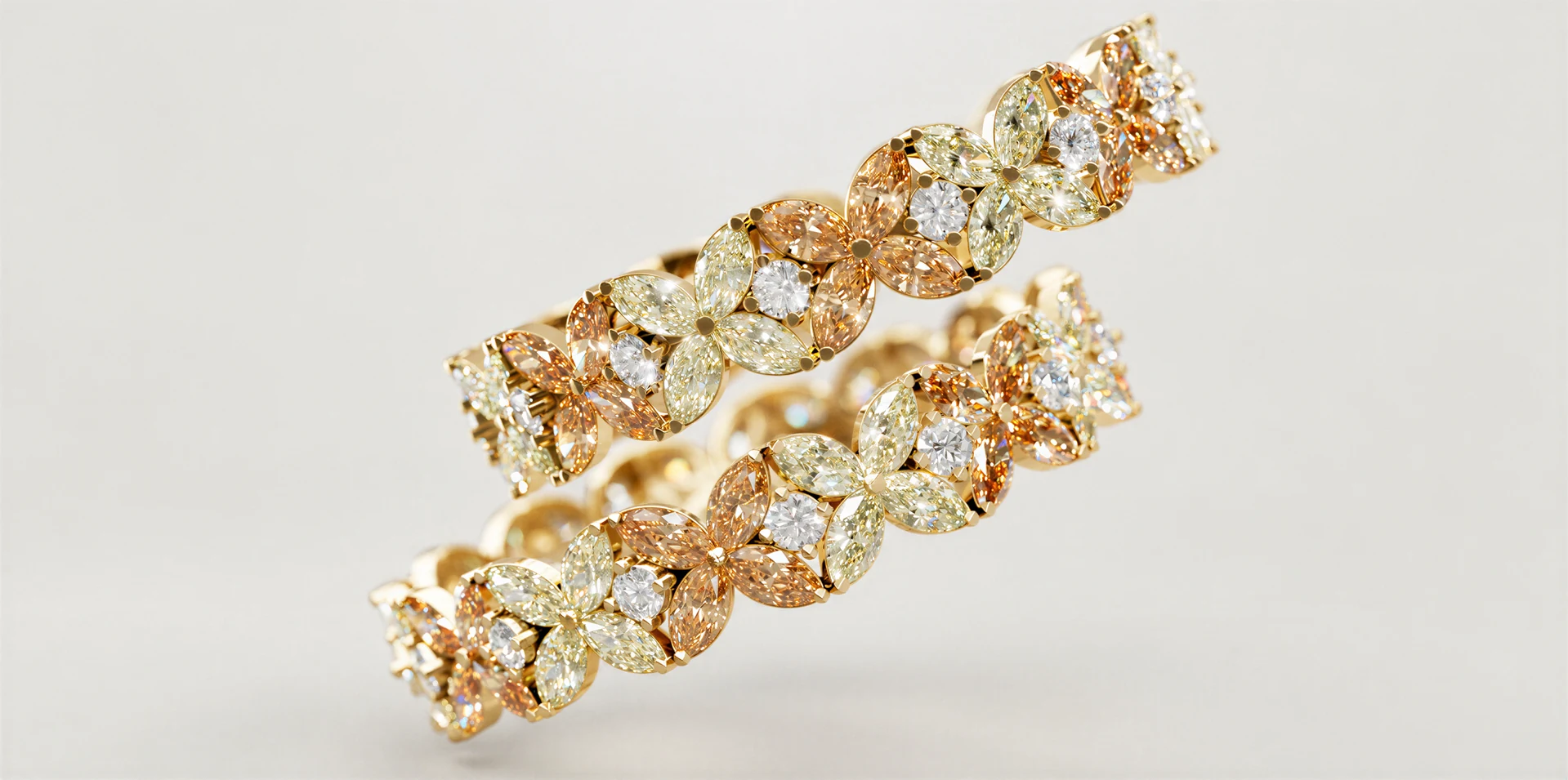
That tension is familiar to jewelry designers. It also explains much of what we have built into Light Tracer Render: wavelength-dependent gemstone optics, separate lighting environments for stones and settings, and a library that lets you choose an actual alloy and finish before you start adjusting the shot.
If you are looking for the best jewelry rendering software for your work, the useful question is how easily you can get those decisions right on your own models. Here is how we approach them in Light Tracer, and where it fits alongside KeyShot, V-Ray, Blender Cycles and OctaneRender.
Try Light Tracer Render free for 14 days
Get full access to create photorealistic renders of your jewelry and products. No credit card. No watermarks. Just sign up with your email.
Give the setting and the stones their own lighting
Independent lighting was a frequent request from our jewelry users. A designer might already be happy with the gold, then spend the next half hour trying to make the diamonds sparkle without changing everything else.
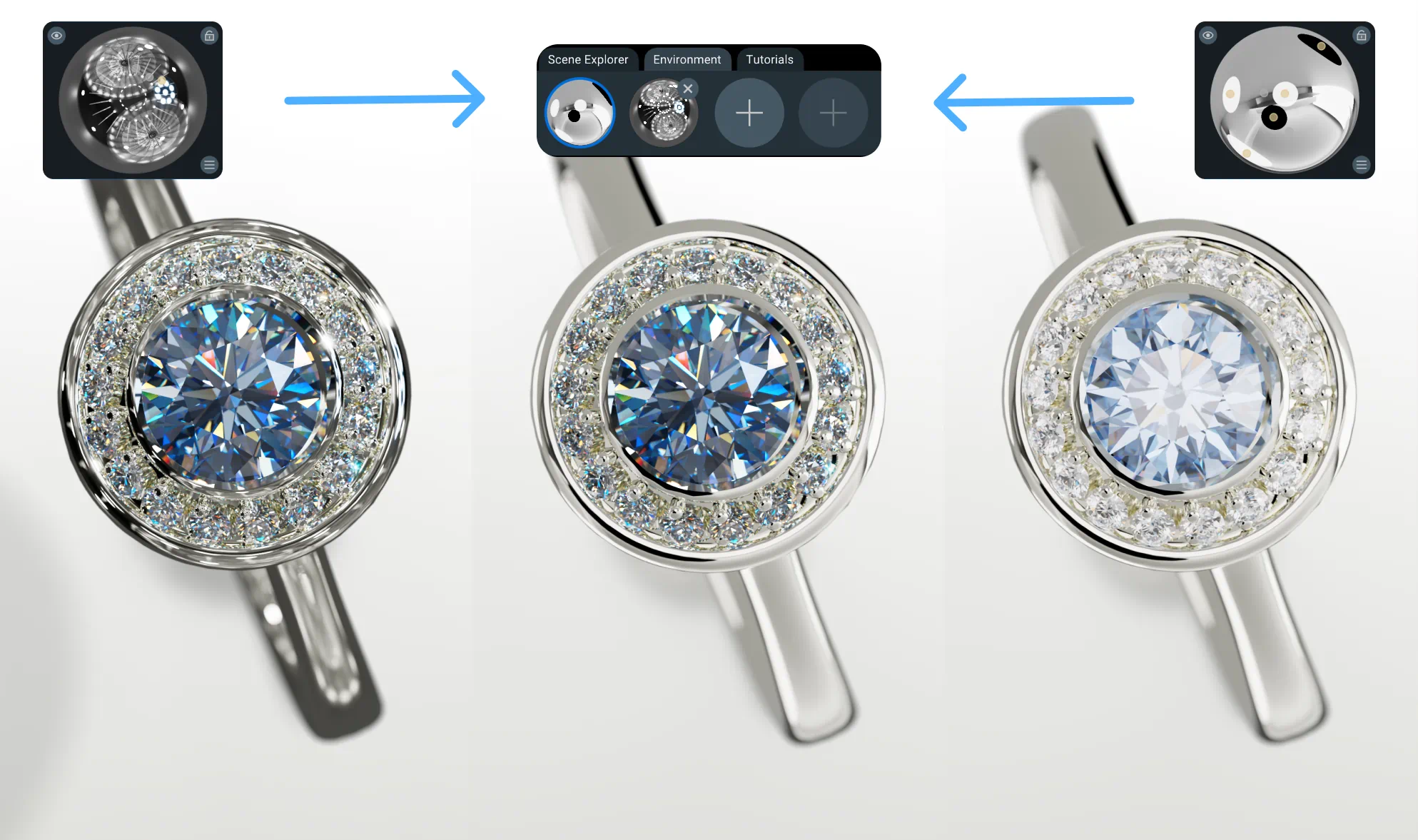
In Light Tracer, you can assign different environments to different materials. Give the setting a broad, soft HDRI and the diamonds an environment with smaller, brighter features. Both appear together in the same render, with each material using its assigned lighting setup.
This makes adjustments much more specific. Rotate the stone environment to find an attractive pattern of bright and dark facets. Adjust the metal environment to keep a continuous highlight along the band. You can work on either without having to accept whatever happens to the other.
Separate environments are an art-direction choice: you are deliberately giving parts of the piece different lighting conditions. When the goal is to reproduce one physical studio setup, use a shared environment. When the goal is a controlled jewelry product image, the extra freedom is valuable.
Render diamond fire through spectral dispersion
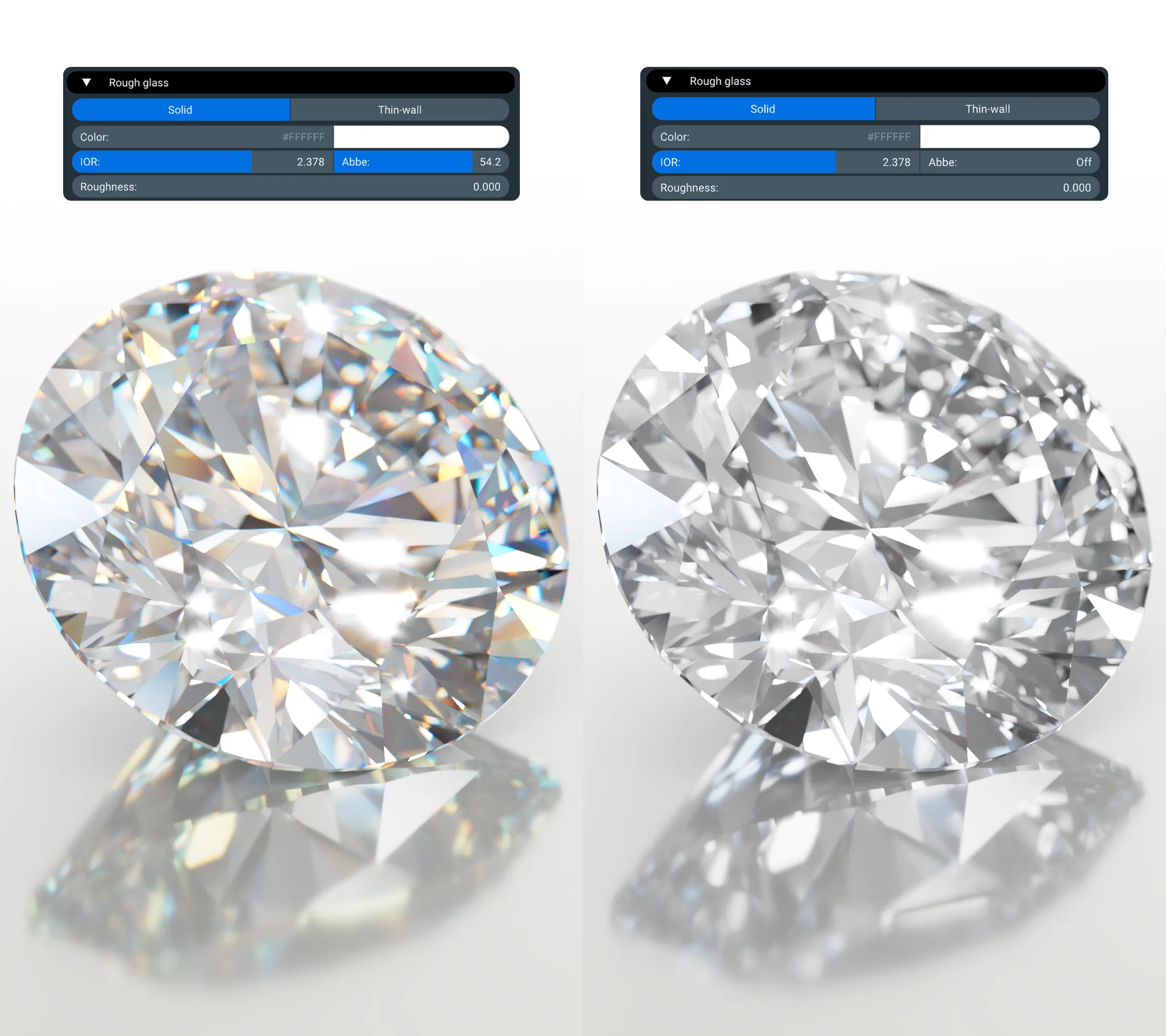
The colored flashes in a diamond come from dispersion: different wavelengths bend by different amounts as light passes through the stone. Their appearance depends on the cut and orientation of the facets as well as the lighting.
Light Tracer calculates wavelength-dependent refraction using a Cauchy dispersion model. A ray's wavelength affects its path through the gemstone, so the resulting color separation follows the optics. Changing the camera or rotating the stone changes which flashes you see.
Start with the diamond preset and work on the lighting first. Small, bright features in the environment can reveal fire; a broad, nearly uniform environment tends to make it less conspicuous. Our jewelry rendering tutorial explores the relationship between lighting, the camera and gemstone appearance.
Choose materials in the language of jewelry
A material library is useful when its choices match the questions you are actually answering. Does this design suit 18K yellow gold or a warmer rose gold? Should the band be polished or brushed? Is the client expecting bare white gold or a rhodium-plated surface?
Light Tracer's built-in jewelry materials include yellow gold at 14K, 18K, 22K and 24K, several rose and red gold alloys, and separate presets for unplated and rhodium-plated white gold. Platinum 950, Palladium 950, silver, sterling silver, black rhodium and oxidized silver are also available.
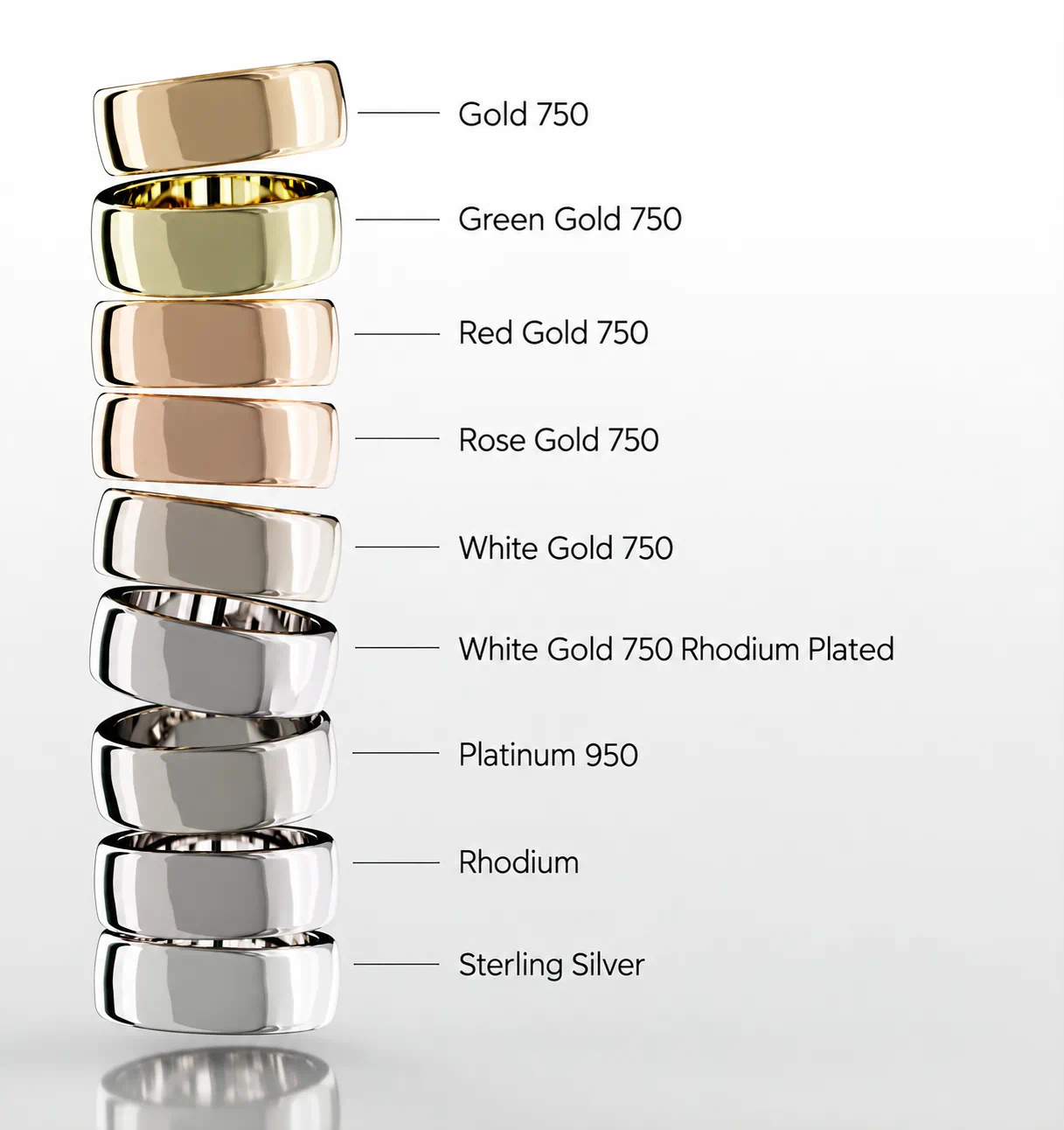
Precious metal material presets applied to the same ring design
The finishes go beyond changing a color. Alongside polished metals, the library includes brushed, hammered, sandblasted and matte surfaces, plus combinations such as brushed hammered and scratched hammered. Texture and roughness change the way reflections break up across a surface; directional brushed presets also use anisotropy to shape the highlight.
Try the same band with a polished and a sandblasted finish under identical lighting. That comparison can tell a client more than two separate beauty shots with different cameras and environments.
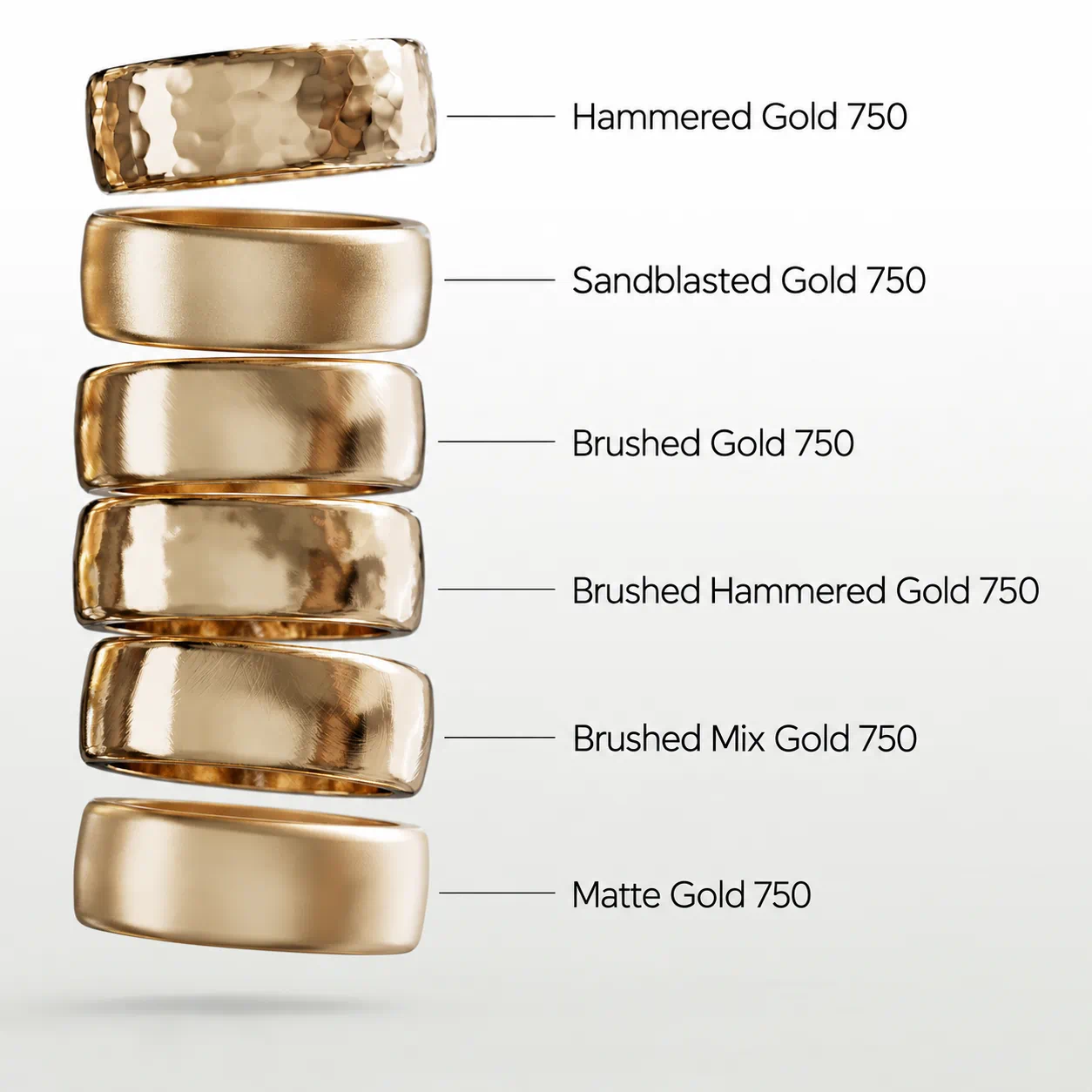
Gold 750 with several surface finishes, from polished to matte
Diamond shades and colored gemstones
The diamond presets cover the D–Z color range in practical groups: a colorless preset, G–H and I–J near-colorless options, K–M faint yellow, N–R very light yellow, and S–V and W–Z light yellow. These are visual starting points based on familiar grading terminology, rather than a substitute for a GIA grading assessment.
There are also 22 Fancy Diamond presets, including yellow, pink, blue and green variants at different intensities, plus champagne, cognac, orange, purple and other colors.
For colored-stone designs, you can start with emerald, ruby, blue sapphire, aquamarine, morganite, topaz, tourmaline, garnet, tanzanite and more. Moissanite and cubic zirconia have their own presets. The transparent gemstone materials combine refractive and dispersion properties with absorption where appropriate, so choosing another stone changes more than its surface color.
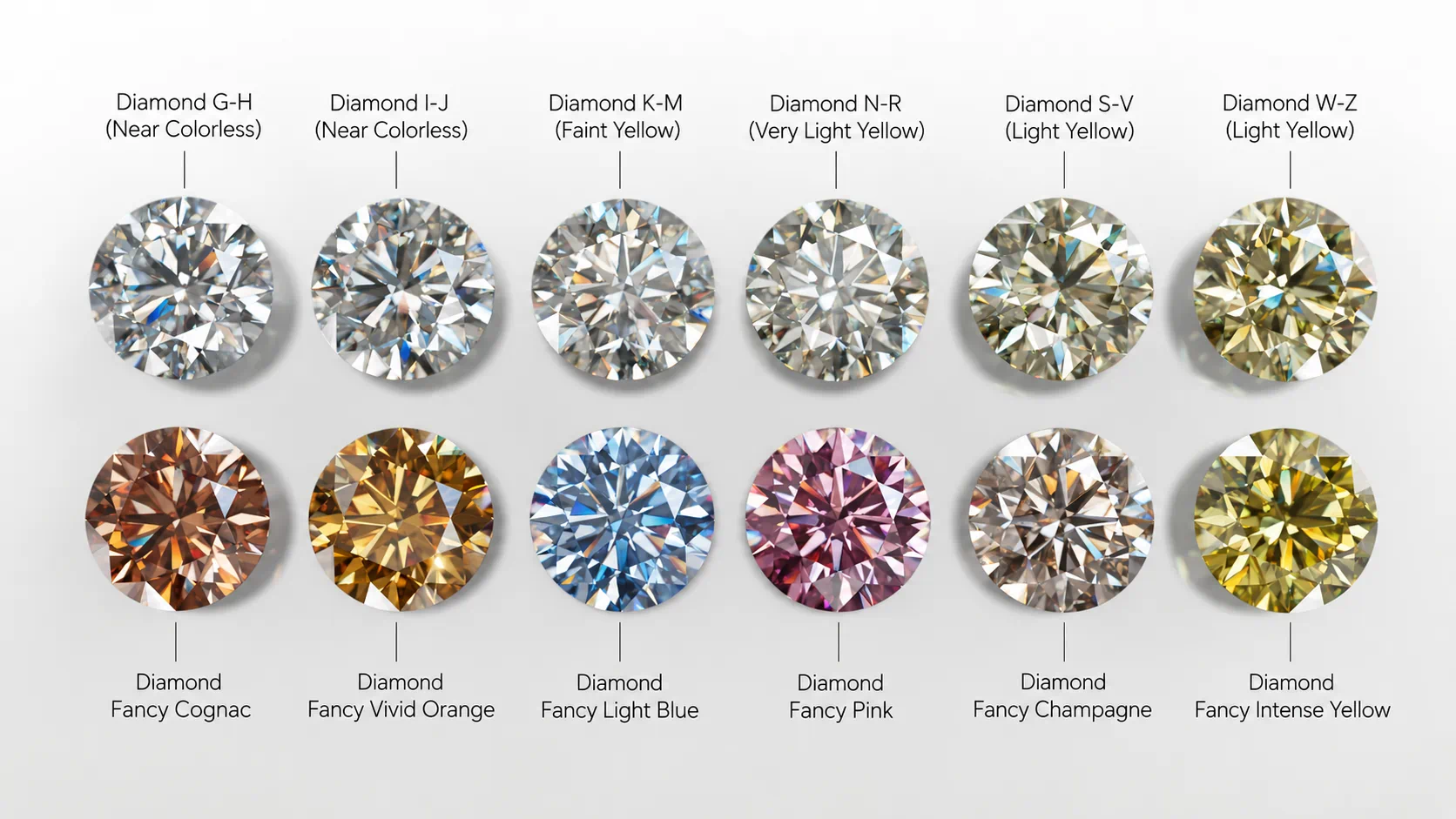
These presets are useful for exploring a design quickly. When matching a particular stone, refine the material against your reference under controlled lighting; individual stones vary.
Use ACES to handle bright reflections and saturated color
Jewelry puts a lot of pressure on the image's tonal range. A diamond can contain very bright flashes beside almost black facets. A polished metal band can reflect both a luminous softbox and the dark space around it.
Light Tracer renders in ACEScg, a scene-linear, wide-gamut working color space. Its ACES filmic tone mapping then maps that lighting range to the display, giving bright highlights a gradual roll-off rather than simply clipping every value above the display limit.
For jewelry, that helps the transition into a bright reflection feel photographic while keeping the rest of the piece readable. Exposure still matters: tone mapping cannot rescue a shot where every important surface has been pushed too bright. It gives you a better basis for balancing the image.
Spend your time adjusting the shot
The practical value of a fast GPU path tracer is how quick you can test an idea. Move a light, check the reflection, rotate the ring a little, and see whether the composition improves. Short feedback cycles make careful lighting much easier.
Light Tracer provides interactive GPU rendering, along with a dedicated Real-time Jewelry mode for smooth, polished jewelry setups. That mode is particularly useful for polished settings and gemstones with a clean background or catcher. Scenes with rough surfaces, diffuse props or more involved light interactions can benefit from the regular rendering modes instead.
The environment library includes HDRIs created for jewelry, and the HDRI editor lets you adjust your studio lighting. Start with a suitable environment, then shape the reflections for the particular piece. A preset saves setup time; a small lighting adjustment is often what makes the render work.
Use caustics when the scene needs them
Diamond fire and caustics play different roles in an image. Fire is the spectral color you see in the stone. Caustics are patterns of concentrated light projected onto another surface after reflection or refraction.
For a hero shot with a gemstone casting light onto a tabletop, Light Tracer's bi-directional rendering mode helps resolve those difficult light paths. For a clean catalog image, visible caustic patterns may contribute very little. Choose the mode for the picture you are making. The caustics tutorial covers this workflow.
Move from Rhino jewelry models to finished images
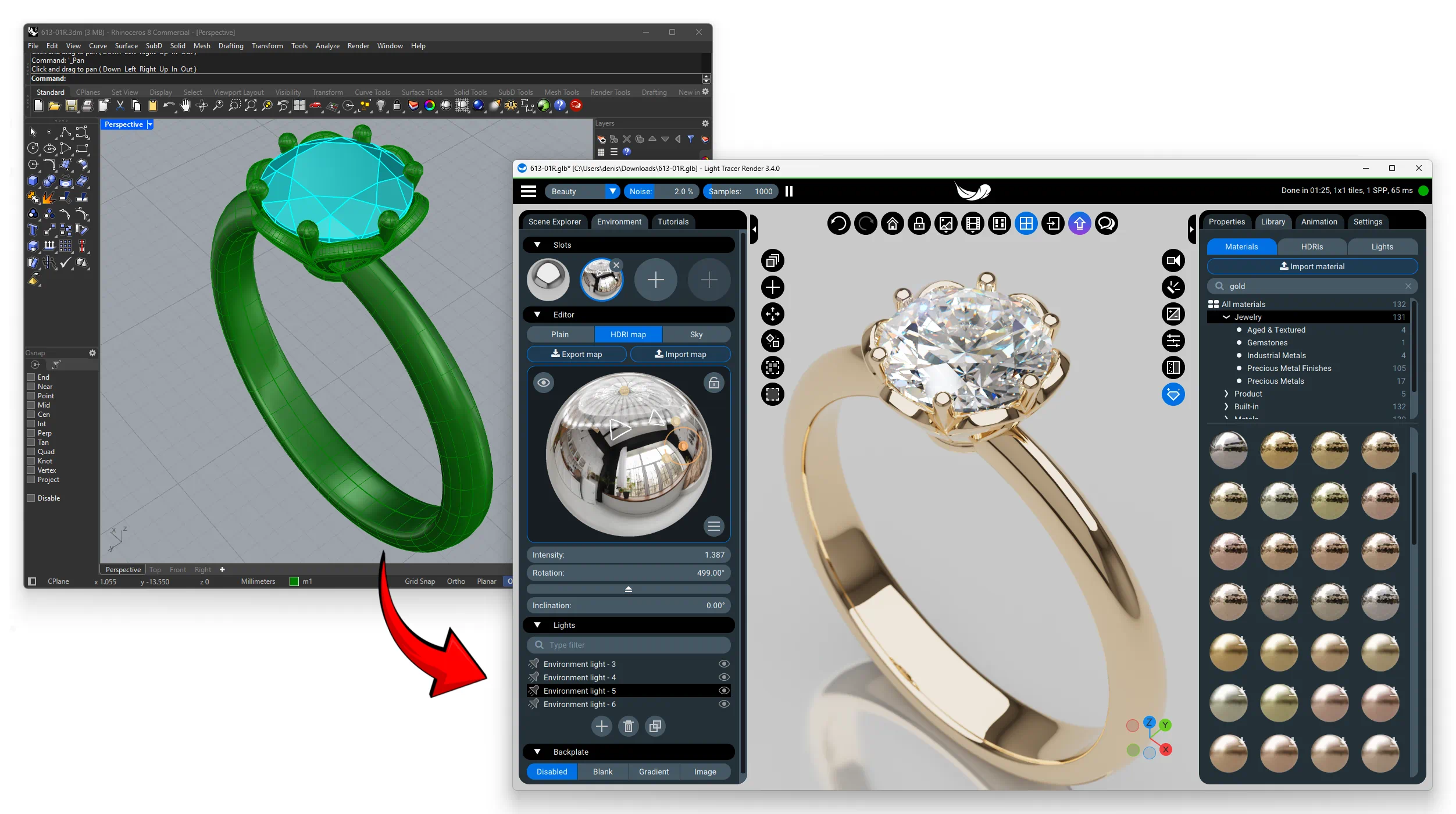
Light Tracer sits after the modeling stage. The desktop application imports Rhino 3DM files and CAD formats including STEP, IGES and BREP, with tessellation controls for the resulting surfaces.
Once the model is ready, reuse a camera and lighting setup to compare alloys, finishes and stones. Shadow and reflection catchers help present the piece against a chosen background. Turntables and camera animation extend the same project into a short product video, where changes in reflections and fire become part of the presentation.
Let the client inspect the piece in Light Space
Light Tracer is available for Windows and macOS, and as a web application. Light Space adds a way to share a prepared scene for interactive viewing.
A still image answers one viewing angle. For a custom ring, the client may also want to examine the profile, the setting and the relationship between the center stone and the band.
Upload the prepared scene to Light Space and send a review link. The recipient can rotate and inspect it in a browser using the same underlying path-tracing engine as Light Tracer app. You can also embed a scene on a website.
Light Space hosts and shares the project; the interactive rendering runs locally on the viewer's device. A compatible WebGPU browser is required, and performance depends on the device. This gives your client a way to explore the work beyond the angles you selected for the final stills.
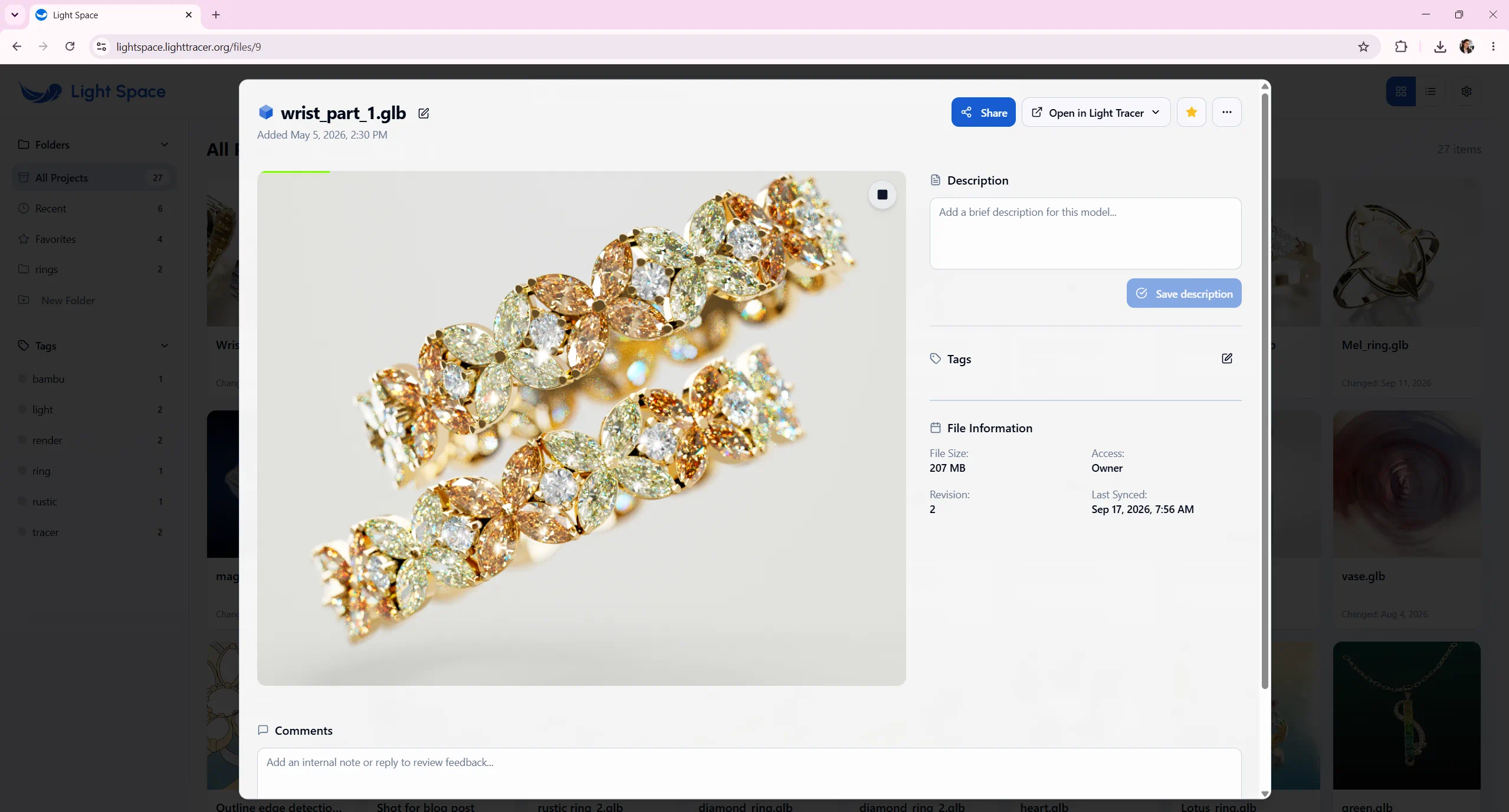
A jewelry project open for interactive viewing in Light Space
How Light Tracer compares with other jewelry renderers
The strongest reason to choose Light Tracer is the combination of gemstone optics, independent material environments, ready-made jewelry materials and browser presentation. Other renderers can also produce excellent jewelry images. Your existing workflow helps determine which is the better fit.
KeyShot is a direct comparison for standalone product visualization. It has a dedicated Gem material with dispersion controls and extensive CAD support. If you depend on its integrations, include those in your decision. Light Tracer is worth testing if your priorities are separate environments for stones and metal, jewelry presets and a perpetual license. Our Light Tracer and KeyShot comparison goes into more detail.
V-Ray for Rhino is worth considering if you prefer to render directly within Rhino. V-Ray for Rhino supports gemstone dispersion, ready-made materials and HDRI lighting directly within Rhino, and can render animations created through Rhino, Grasshopper or Bongo. Light Tracer brings jewelry presentation into a dedicated application, combining separate environments for stones and settings with interactive GPU rendering, a built-in HDRI editor, and tools for animating objects, cameras and lighting.
Blender Cycles is a powerful, free rendering option, especially if you also need Blender's modeling and animation tools. For jewelry designers starting with a finished CAD model, however, its extensive interface and node-based material workflow can take time to learn. In Blender 5.2 LTS, gemstone dispersion requires a custom shader setup or add-on rather than a built-in material control, although native dispersion is coming in Blender 5.3. Material libraries are available, but assembling suitable gemstone, precious-metal and finish presets can involve additional searching and setup. Light Tracer provides a more direct starting point: built-in spectral dispersion, ready-made jewelry materials and dedicated lighting tools, so you can focus on the piece and its presentation.
OctaneRender is a capable spectral GPU renderer with built-in dispersion and extensive material controls, making it a strong option for jewelry visualization. Its node-based standalone workflow offers considerable flexibility, but can require more technical familiarity from designers who mainly want to present finished CAD models. Hardware compatibility also matters: Octane requires NVIDIA GPUs on Windows, while its Mac version supports Apple silicon. Light Tracer offers a more focused jewelry workflow with direct CAD import, ready-made gemstone and precious-metal presets, and a built-in HDRI editor. Support for compatible NVIDIA, AMD and Intel GPUs on Windows also gives you more flexibility to work with the hardware you already own.
Pay once, keep rendering
Light Tracer's perpetual license lets you make rendering a lasting part of your studio workflow without adding a recurring subscription. A one-time purchase of US$169.99 includes continued use of the purchased version, updates within version 3.x, and access to the full-featured web application. Future major-version upgrades are outside the included update entitlement.
For comparison, KeyShot Professional costs US$1,299 per year, billed annually. Light Tracer's perpetual license costs less than two months of that annual plan's equivalent monthly price—leaving more of your budget for design and production. Whether you render every day or return to a collection months later, you can keep using your purchased version without renewing a subscription.
If you prefer a smaller initial commitment, Light Tracer also offers a US$12.99 monthly plan. Prices checked on September 23, 2026; see the Light Tracer plans and KeyShot pricing for current offers.
Try it with a piece you already know
Use a model you have rendered before. Choose a metal preset and a diamond preset, then give the setting and stones separate environments. Compare a few finishes without changing the camera. Finally, open the scene through a Light Space review link and look at it from an angle you did not prepare.
That exercise tells you more than a generic renderer ranking: whether you can get the reflections you want, whether the gemstones look convincing, and whether the result is easy to show to a client.
Start the 14-day Light Tracer Render trial and try it with your own jewelry model.
Common questions about jewelry rendering
Is Light Tracer a KeyShot alternative for jewelry
Yes. Both are options for standalone jewelry and product visualization. Light Tracer is particularly relevant if you want spectral dispersion, separate material environments, built-in jewelry presets and a perpetual-license option. Check your required import formats and workflow with your own project.
Can Light Tracer render Rhino jewelry models
Yes. The desktop version imports 3DM files, as well as STEP, IGES and BREP. CAD tessellation settings let you balance curved-surface quality and model complexity before rendering.
Does realistic diamond rendering always need visible caustics
No. Dispersion creates diamond fire, while caustics describe concentrated light falling onto other surfaces. Both can matter, but a clean catalog image does not always need a visible caustic pattern.
Can clients view a jewelry render interactively in a browser
Yes. A Light Space review link lets them inspect the prepared scene with local path tracing in a compatible WebGPU browser. The experience depends on their device and browser support.